
§ 读写分离
本文描述如何为 MGR 集群构建读写分离方案。
§ InnoDB Cluster 简介
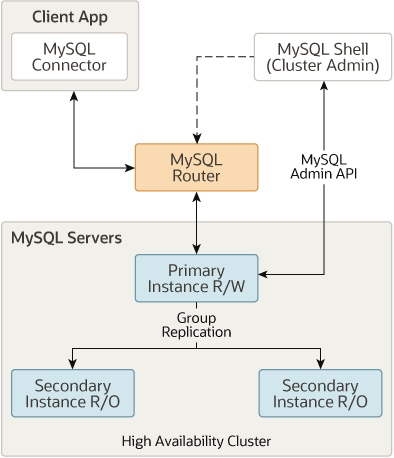
MySQL InnoDB Cluster(简称 MIC)是 MySQL 推出的整套解决方案,由几个部分组成:
- MySQL Server,核心是 Group Replication(组复制),简称 MGR。
- MySQL Shell,可编程的高级客户端,支持标准 SQL 语法、JavaScript 语法、Python 语法,以及 API 接口,可以更方便的管理和使用 MySQL 服务器。
- MySQL Router,轻量级中间件,支持透明路由规则(读写分离及读负载均衡)。
MySQL Router 是一个轻量级的中间件,它采用多端口的方案实现读写分离以及读负载均衡,而且同时支持 MySQL 和 MySQL X 协议。
整体系统架构如下图所示:
§ MySQL Router 安装 & 初始化
MySQL Router 最好和应用服务器部署在一起,所以本次将 MySQL Router 安装在另一个服务器上,IP 地址是 172.16.16.14。
将 MySQL Router 和应用服务器部署在一起的好处在于,当某个后端数据库服务器发生宕机并下线及导致 MGR 发生切换时,部署在应用程序端的 router 程序能通过 MGR 的 metadata 信息感知到这个变化,并自动更新 MGR 拓扑结构,无需在应用程序上做任何变更,也无需针对 router 再次部署高可用切换方案。
戳此下载 MySQL Router RPM 安装包 (opens new window),选择下面的安装包:
- greatsql-mysql-router-8.0.32-25.1.el8.x86_64.rpm
下载到本地后,执行安装:
$ rpm -ivh greatsql-mysql-router-8.0.32-25.1.el8.x86_64.rpm

...
Verifying...                          ################################# [100%]
Preparing...                          ################################# [100%]
Updating / installing...
   1:greatsql-mysql-router-8.0.32-25.1################################# [100%]
2
3
4
5
6
7
MySQL Router 对应的服务器端程序文件是 /usr/bin/mysqlrouter,第一次启动时要先进行初始化:
# 参数解释
# 参数 --bootstrap 表示开始初始化
# 参数 GreatSQL@172.16.16.10:3306 是 MGR 集群管理员账号
# --user=mysqlrouter 是运行 mysqlrouter 进程的系统用户名

$ mysqlrouter --bootstrap GreatSQL@172.16.16.10:3306 --user=mysqlrouter

...
Please enter MySQL password for GreatSQL:   <-- 输入密码
# 然后 mysqlrouter 开始自动进行初始化
# 它会自动读取 MGR 的元数据信息,自动生成配置文件
# Bootstrapping system MySQL Router instance...

- Creating account(s) (only those that are needed, if any)
- Verifying account (using it to run SQL queries that would be run by Router)
- Storing account in keyring
- Adjusting permissions of generated files
- Creating configuration /etc/mysqlrouter/mysqlrouter.conf

Existing configuration backed up to '/etc/mysqlrouter/mysqlrouter.conf.bak'

# MySQL Router configured for the InnoDB Cluster 'GreatSQLMGR'

After this MySQL Router has been started with the generated configuration

    $ /etc/init.d/mysqlrouter restart
or
    $ systemctl start mysqlrouter
or
    $ mysqlrouter -c /etc/mysqlrouter/mysqlrouter.conf

the cluster 'GreatSQLMGR' can be reached by connecting to:

## MySQL Classic protocol  <-- MySQL 协议的两个端口

- Read/Write Connections: localhost:6446
- Read/Only Connections:  localhost:6447

## MySQL X protocol  <-- MySQL X 协议的两个端口

- Read/Write Connections: localhost:6448
- Read/Only Connections:  localhost:6449
2
3
4
5
6
7
8
9
10
11
12
13
14
15
16
17
18
19
20
21
22
23
24
25
26
27
28
29
30
31
32
33
34
35
36
37
38
39
40
41
42
这就初始化完毕了,按照上面的提示,直接启动 mysqlrouter 服务即可:
$ systemctl start mysqlrouter

$ ps -ef | grep -v grep | grep mysqlrouter
mysqlro+  6026     1  5 09:28 ?        00:00:00 /usr/bin/mysqlrouter

$ netstat -lntp | grep mysqlrouter

...
tcp        0      0 0.0.0.0:6446            0.0.0.0:*               LISTEN      6026/mysqlrouter
tcp        0      0 0.0.0.0:6447            0.0.0.0:*               LISTEN      6026/mysqlrouter
tcp        0      0 0.0.0.0:6448            0.0.0.0:*               LISTEN      6026/mysqlrouter
tcp        0      0 0.0.0.0:6449            0.0.0.0:*               LISTEN      6026/mysqlrouter
tcp        0      0 0.0.0.0:8443            0.0.0.0:*               LISTEN      6026/mysqlrouter
2
3
4
5
6
7
8
9
10
11
12
13
可以看到 mysqlrouter 服务正常启动了。
§ MySQL Router 配置
MySQL Router 初始化时自动生成的配置文件是 /etc/mysqlrouter/mysqlrouter.conf,主要是关于 R/W、RO 不同端口以及请求转发规则等配置,例如:
[routing:GreatSQLMGR_rw]
bind_address=0.0.0.0
bind_port=6446
destinations=metadata-cache://GreatSQLMGR/?role=PRIMARY
routing_strategy=first-available
protocol=classic

[routing:GreatSQLMGR_ro]
bind_address=0.0.0.0
bind_port=6447
destinations=metadata-cache://GreatSQLMGR/?role=SECONDARY
routing_strategy=round-robin-with-fallback
protocol=classic
2
3
4
5
6
7
8
9
10
11
12
13
可以根据需要自行修改绑定的 IP 地址和端口,以及请求转发规则。
关于请求转发规则,更详细的解释可参考以下内容:
修改完配置后,重启 mysqlrouter 服务即可。
§ 确认读写分离
现在,用客户端连接到 6446(读写)端口,确认连接的是 PRIMARY 节点:
-- mysql -h172.16.16.14 -uGreatSQL -p -P6446

greatsql> SELECT @@server_uuid;
+--------------------------------------+
| @@server_uuid                        |
+--------------------------------------+
| 66c5a894-07e6-11ed-b1ff-00155d064000 |
+--------------------------------------+

greatsql> SELECT MEMBER_ID,MEMBER_HOST,MEMBER_ROLE FROM performance_schema.replication_group_members;
+--------------------------------------+--------------+-------------+
| MEMBER_ID                            | MEMBER_HOST  | MEMBER_ROLE |
+--------------------------------------+--------------+-------------+
| 62edd23f-07fa-11ed-aad1-00155d064000 | 172.16.16.13 | SECONDARY   |
| 66c5a894-07e6-11ed-b1ff-00155d064000 | 172.16.16.10 | PRIMARY     |
| 6e65ef68-07e6-11ed-a6d8-00155d064000 | 172.16.16.11 | SECONDARY   |
| 6f367f17-07e6-11ed-825d-00155d064000 | 172.16.16.12 | ARBITRATOR  |
+--------------------------------------+--------------+-------------+
2
3
4
5
6
7
8
9
10
11
12
13
14
15
16
17
18
确实是连接的 PRIMARY 节点。
同样地,连接 6447(只读)端口,确认连接的是 SECONDARY 节点:
-- mysql -h172.16.16.14 -uGreatSQL -p -P6447

greatsql> SELECT @@server_uuid;
+--------------------------------------+
| @@server_uuid                        |
+--------------------------------------+
| 62edd23f-07fa-11ed-aad1-00155d064000 |
+--------------------------------------+
2
3
4
5
6
7
8
确实是连接的 SECONDARY 节点。
该连接保持住不退出,继续新建到 6447 端口的连接,查看 server_uuid,应该会发现读取到的是另一个 SECONDARY 节点的值,因为 MySQL Router 默认的读负载均衡机制是在几个只读节点间自动轮询,除非所有 SECONDARY 节点都不可用,否则只读请求不会转发到 PRIMARY 节点。
特别说明
由于 ARBITRATOR 角色是在 GreatSQL 中特有的,原生的 MySQL Router 并不支持。这个节点不存储用户数据、日志等,仅参与 MGR 的网络投票,因此当 MySQL Router 轮询连接到该节点时,可能会出现类似下面的提示:
$ mysql -h172.16.16.14 -uGreatSQL -p -P6447

mysql: [Warning] Using a password on the command line interface can be insecure.
ERROR 1045 (28000): Access denied for user 'GreatSQL'@'172.16.16.14' (using password: YES)
2
3
4
忽略这个错误提示,并尝试重连即可。
当然了,也可以通过修改 MySQL Router 的配置文件 /etc/mysqlrouter/mysqlrouter.conf,把 ARBITRATOR 节点从只读节点列表中排除,例如:
[routing:GreatSQLMGR_ro]
bind_address=0.0.0.0
bind_port=6447
#destinations=metadata-cache://GreatSQLMGR/?role=SECONDARY
destinations=172.16.16.11,172.16.16.13
#routing_strategy=round-robin-with-fallback
routing_strategy=round-robin
protocol=classic
2
3
4
5
6
7
8
由于直接指定了只读节点列表,就无法再使用 round-robin-with-fallback 策略了,可以改成 round-robin 策略。
§ 确认故障自动转移
如果 PRIMARY 节点宕机或切换,mysqlrouter 也能实现自动故障转移,应用端不需要做任何变更,只需最多尝试重连或重新发起请求。
登录 MGR 集群任意节点:
-- 先用 mysqlsh 客户端连接
-- mysqlsh --uri GreatSQL@172.16.16.10:3306
-- 在 mysqlsh 客户端中执行下面的命令

MySQL  172.16.16.10:3306 ssl  JS > c=dba.getCluster();
MySQL  172.16.16.10:3306 ssl  JS > c.setPrimaryInstance('172.16.16.11:3306');   <-- 切换 PRIMARY 节点
Setting instance '172.16.16.11:3306' as the primary instance of cluster 'GreatSQLMGR'...

Instance '172.16.16.10:3306' was switched from PRIMARY to SECONDARY.   <-- 切换了,从 PRIMARY 到 SECONDARY
Instance '172.16.16.11:3306' was switched from SECONDARY to PRIMARY.   <-- 切换了,从 SECONDARY 到 PRIMARY
Instance '172.16.16.12:3306' remains ARBITRATOR.   <-- 保持不变
Instance '172.16.16.13:3306' remains SECONDARY.   <-- 保持不变

WARNING: The cluster internal session is not the primary member anymore. For cluster management operations please obtain a fresh cluster handle using dba.getCluster().

The instance '172.16.16.11:3306' was successfully elected as primary.
2
3
4
5
6
7
8
9
10
11
12
13
14
15
16
回到前面连接 6446 端口的那个会话,再次查询 server_uuid,此时会发现连接自动断开了:
greatsql> SELECT @@server_uuid;
ERROR 2013 (HY000): Lost connection to MySQL server during query

greatsql> SELECT @@server_uuid;
ERROR 2006 (HY000): MySQL server has gone away
No connection. Trying to reconnect...
Connection id:    157990
Current database: *** NONE ***

+--------------------------------------+
| @@server_uuid                        |
+--------------------------------------+
| 6e65ef68-07e6-11ed-a6d8-00155d064000 |   <-- 确认 server_uuid 变成 172.16.16.11 节点的值
+--------------------------------------+
2
3
4
5
6
7
8
9
10
11
12
13
14
这就实现了自动故障转移。
再次查看切换后的 MGR 集群状态:
MySQL  172.16.16.10:3306 ssl  JS >  c.status();
...
        "topology": {
            "172.16.16.10:3306": {
                "address": "172.16.16.10:3306",
                "memberRole": "SECONDARY",   <-- 切换成 SECONDARY 节点
                "mode": "R/O",
                "readReplicas": {},
                "replicationLag": null,
                "role": "HA",
                "status": "ONLINE",
                "version": "8.0.32"
            },
            "172.16.16.11:3306": {
                "address": "172.16.16.11:3306",
                "memberRole": "PRIMARY",   <-- 新的 PRIMARY 节点
                "mode": "R/W",
                "readReplicas": {},
                "replicationLag": null,
                "role": "HA",
                "status": "ONLINE",
                "version": "8.0.32"
            },
...
2
3
4
5
6
7
8
9
10
11
12
13
14
15
16
17
18
19
20
21
22
23
24
利用 MySQL Router 构建一套支持读写分离、读负载均衡以及故障自动转移的 MGR 集群就部署完成。
扫码关注微信公众号