
§ Binary Log
§ What Is the Binary Log
Binlog is one of the most important logs of GreatSQL.
Binlog, i.e., Binary Log, the binary log file, is also called the Update Log. It records all events that change the database, such as all DDL and DML operations, but does not include statements that do not modify any data (such as SELECT read-only query requests).
Binlog is recorded in the form of Events and stored in binary files. Using these Events, the entire process of data changes can be easily reproduced. Therefore, Binlog is commonly used in scenarios such as source-replica replication and MGR.
Tip
If you want to record all requests, you need to use the general log.
§ Application Scenarios
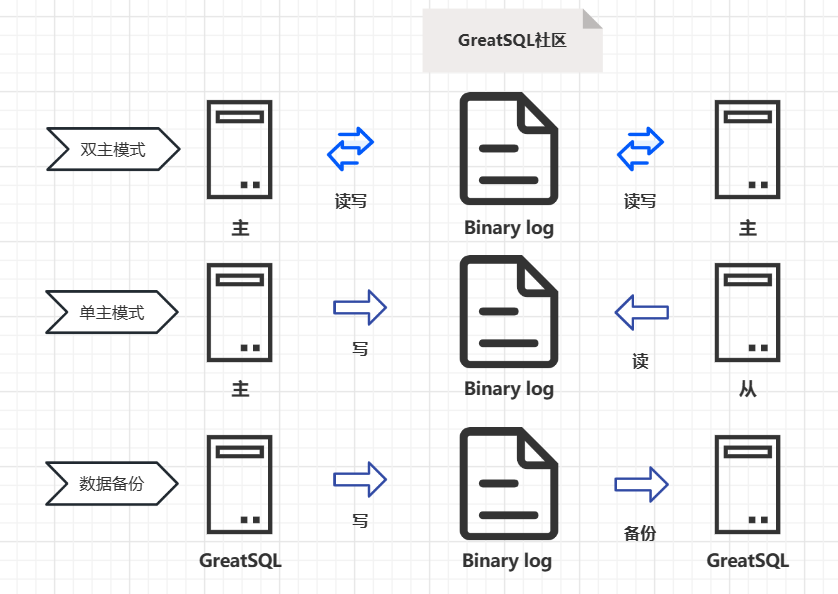
The main application scenarios of Binlog are as follows:
- Used for data recovery. If unexpected events such as misoperations on the database occur (accidentally deleted data, accidentally deleted databases or tables, etc.), the full backup can be used to restore most of the data first, and then Binlog can be used to restore to the point in time before the misoperation occurred, achieving lossless recovery of business data.
- Used for source-replica replication or MGR group replication. Both source-replica replication and MGR group replication are logical replication implemented based on Binlog.
- Used for auditing. Since Binlog records all change operations on the database, it can also be used for auditing to a certain extent, helping to discover some potentially non-compliant or risky operations.
In summary, it can be said that data backup, source-replica replication, and MGR of the GreatSQL database are all inseparable from Binlog.
§ Enabling Binlog
Execute the following command to view whether Binlog is enabled. It is enabled by default:
greatsql> SHOW VARIABLES LIKE '%log_bin%';
+---------------------------------+-----------------------------+
| Variable_name                   | Value                       |
+---------------------------------+-----------------------------+
| log_bin                         | ON                          |
| log_bin_basename                | /data/GreatSQL/binlog       |
| log_bin_index                   | /data/GreatSQL/binlog.index |
| log_bin_trust_function_creators | ON                          |
| log_bin_use_v1_row_events       | OFF                         |
| sql_log_bin                     | ON                          |
+---------------------------------+-----------------------------+
6 rows in set (0.01 sec)
2
3
4
5
6
7
8
9
10
11
12
log_binThe master switch for enabling Binlog, with selectable values of ON/OFF.log_bin_basenameis the basic file name prefix of Binlog. The actual Binlog appends a numeric identifier to it to represent each file, for example: binlog.000001, binlog.003306. It supports setting a full path or only the basic file name, for examplelog_bin_basename=binlog.log_bin_indexis the index file name of Binlog. This file records the list of all Binlog files.log_bin_trust_function_creatorssets whether to trust all stored program creators. The default value of this parameter is OFF, to prevent some stored program creators from unintentionally or maliciously damaging the database. When set to OFF, accounts without SUPER privileges cannot create or modify stored programs, even if these accounts already haveCREATE ROUTINEorALTER ROUTINEprivileges. When set to OFF, ordinary accounts that want to create stored programs need to specify theDETERMINISTICorREADS SQL DATAorNO SQLidentifiers to declare that the database will not be modified, and then they can create/modify stored programs. Setting it to ON is convenient for developers, but may pose database security risks.log_bin_use_v1_row_eventshas been deprecated since 8.0.18 and is not explained.sql_log_binis used to set whether Binlog is enabled in the current session, with a default value of ON. When set to OFF, all change operations on the database in the current session will not be recorded in Binlog, which may damage database consistency and cause source-replica replication or MGR to work abnormally, so the permission to set this parameter needs to be strictly controlled. Before 8.0.14, theSYSTEM_VARIABLES_ADMINorSUPERprivilege was required to modify the setting; starting from 8.0.14, at least theSESSION_VARIABLES_ADMINprivilege is required to modify the setting.
§ Setting Up Binlog
Modify the my.cnf configuration file of GreatSQL and adjust the parameters related to Binlog:
[mysqld]
# Required parameters
log_bin=/data/GreatSQL/binlog

# Optional parameters
binlog_expire_logs_seconds=604800
max_binlog_size=1G
binlog_format=ROW
sync_binlog=1
max_binlog_size=1G
binlog_cache_size=4M
max_binlog_cache_size=2G
binlog_checksum=CRC32
binlog_transaction_dependency_tracking=WRITESET
2
3
4
5
6
7
8
9
10
11
12
13
14
log_binThe master switch for enabling Binlog. As long as the value of this parameter is not set to OFF, Binlog is enabled. If set to
log_bin=1orlog_bin=ON, it only means turning on Binlog without setting the basic file name of Binlog files; if set to a string, it means turning on Binlog and also setting the basic file name of Binlog, supporting a full path or only the file name, such aslog_bin=binlogorlog_bin=/data/GreatSQL/binlog.binlog_expire_logs_secondsSets how long Binlog is automatically deleted after, in units of seconds. The default value is 2592000 seconds, i.e., 30 days. It is generally recommended to keep it for 7 days, i.e., 604800 seconds, and adjust according to business needs.
max_binlog_sizeSets the size of each Binlog file. The maximum and default values are both 1GB, and 1GB is generally also recommended. When the Binlog file size exceeds this threshold, a log rotate action is automatically performed to generate a new Binlog file. An exception is that when a transaction has not been committed, even if the Binlog file size has exceeded the threshold at that time, in order to ensure the integrity of the transaction, log rotation is not forcibly performed; rotation is only performed after the transaction ends. Therefore, you may sometimes see a Binlog file exceeding the preset threshold.
binlog_formatSets the Binlog format, supporting three options: STATEMENT (statement format), ROW (row format), MIXED (mixed format). The default is ROW format, and ROW format is also strongly recommended.
STATEMENT
In STATEMENT mode, the binary log records each executed SQL statement. This is the earliest binary log format, suitable for scenarios that rely less on complex SQL statements. Advantages: smaller generated log files; lower replication overhead. Disadvantages: in some cases, replaying SQL statements may lead to unexpected results (such as containing non-deterministic functions); additional locks may need to be added in the replication environment to ensure consistency.
ROW
In ROW mode, the binary log records the changes of each row of data. That is, it records the specific changes of data rows rather than the SQL statements themselves. Advantages: suitable for all types of SQL statements, ensuring replication consistency; more precise, suitable for high-complexity and high-concurrency environments. Disadvantages: larger generated log files, especially for batch operations; higher replication overhead and more data transmission.
MIXED
MIXED mode combines STATEMENT and ROW modes. In this mode, MySQL usually chooses STATEMENT mode to record logs, but in some cases requiring precision (such as non-deterministic functions or statements containing user variables), it automatically switches to ROW mode. Advantages: combines the advantages of both, more adaptable; improves replication accuracy and performance. Disadvantages: log size and performance overhead are between STATEMENT and ROW.
Note: Modifying binlog_format requires considering the characteristics of the current replication topology and workload; switching log formats may affect ongoing transactions, so it is recommended to do it during off-peak hours or maintenance windows.
sync_binlogUsed to control the synchronization (flush) mode of Binlog, with a default value of 1. Setting
sync_binlog=Nmeans that after writing N Binlog Events, the Binlog is synchronized and flushed to disk, to ensure data consistency and durability. Settingsync_binlog=1provides the strongest data security but greatly affects performance; setting a larger value improves performance but increases the risk of data loss. In business scenarios requiring high consistency, be sure to setsync_binlog=1to ensure data security.binlog_cache_sizeandmax_binlog_cache_sizeThe parameter
binlog_cache_sizeis used to set the size of the session-level Binlog cache. This cache is used to store Binlog Events before transaction commit. Themax_binlog_cache_sizeparameter defines the maximum total size of the Binlog cache for all sessions, limiting the maximum cache space a single transaction can use. When a transaction is very large, the following error may occur:Multi-statement transaction required more than 'max_binlog_cache_size' bytes of storage. At this time, themax_binlog_cache_sizeparameter value needs to be appropriately increased.binlog_checksumUsed to set the checksum type of Binlog Events to ensure data integrity. The selectable values are NONE (no checksum) and CRC32 (checksum using the CRC32 algorithm). CRC32 is recommended to detect and prevent log file corruption. In an MGR architecture, if it is before 8.0.20,
binlog_checksum=NONEis required, but after 8.0.20,binlog_checksum=CRC32can be set.binlog_transaction_dependency_trackingUsed to control how the GreatSQL primary server tracks transaction dependencies when generating Binlog. This is very important for improving the parallel replication performance of secondary servers. The selectable values include:
- COMMIT_ORDER, tracking dependencies in the order of transaction commits. This is the default value. Suitable for most workloads, but with lower parallelism.
- WRITESET: tracking dependencies based on the write set of transactions. If there are no write set conflicts between transactions, they can be executed in parallel. Suitable for workloads with high-concurrency write operations.
- WRITESET_SESSION, tracking dependencies based on the write set and by session. This means that even if there are no conflicts between write sets, transactions of the same session are still executed in order. Suitable for scenarios where there is a certain order between transactions but high parallelism is also needed.
For high-concurrency write operations, setting WRITESET usually provides better parallelism.
Tip
If possible, it is best not to put the database files and Binlog log files on the same physical disk. On the one hand, this reduces contention for physical I/O read/write requests; on the other hand, it can reduce the single point of failure risk, avoiding damage to both at the same time.
§ Viewing Binlog
When GreatSQL creates Binlog files, it first creates the index file defined by log_bin_index, then creates log files with the basic name defined by log_bin (basename) and a numeric suffix, for example: binlog.000001.
Each time the GreatSQL service process restarts, the numeric suffix of Binlog files automatically increments. When the current Binlog file size exceeds the threshold defined by max_binlog_size, a new log file is automatically rotated.
Execute the following command to view the list and sizes of all current Binlog files:
greatsql> SHOW BINARY LOGS;
+---------------+------------+-----------+
| Log_name      | File_size  | Encrypted |
+---------------+------------+-----------+
| binlog.000101 | 1073967237 | No        |
| binlog.000102 |  368552117 | No        |
+---------------+------------+-----------+
2
3
4
5
6
7
This indicates that there are currently two Binlog files. The third column Encrypted indicates whether Binlog is encrypted.
All change operations of the database are recorded in Binlog, but Binlog is binary rather than plain text, so it cannot be viewed directly in plain text. The mysqlbinlog tool is needed:
cd /data/GreatSQL && mysqlbinlog ./binlog.000102 | less
View the result
# at 972
#240704 14:20:52 server id 3306  end_log_pos 1058 CRC32 0x1752752f      GTID    last_committed=1        sequence_number=2       rbr_only=yes    original_committed_timestamp=1
720074052491915   immediate_commit_timestamp=1720074052492308     transaction_length=1244
/*!50718 SET TRANSACTION ISOLATION LEVEL READ COMMITTED*//*!*/;
# original_commit_timestamp=1720074052491915 (2024-07-04 14:20:52.491915 CST)
# immediate_commit_timestamp=1720074052492308 (2024-07-04 14:20:52.492308 CST)
/*!80001 SET @@session.original_commit_timestamp=1720074052491915*//*!*/;
/*!80014 SET @@session.original_server_version=80032*//*!*/;
/*!80014 SET @@session.immediate_server_version=80032*//*!*/;
SET @@SESSION.GTID_NEXT= '46dda72d-ceec-11ee-be3f-d08e7908bcb1:994406'/*!*/;
# at 1058
#240704 14:20:52 server id 3306  end_log_pos 1142 CRC32 0x199cc2e6      Query   thread_id=713   exec_time=0     error_code=0
SET TIMESTAMP=1720074052/*!*/;
BEGIN
/*!*/;
# at 1142
# at 1596
#240704 14:20:52 server id 3306  end_log_pos 1668 CRC32 0xb8dd2245      Table_map: `greatsql`.`t_803225` mapped to number 400
# has_generated_invisible_primary_key=0
# at 1668
#240704 14:20:52 server id 3306  end_log_pos 2185 CRC32 0x10809f2a      Write_rows: table id 400 flags: STMT_END_F

BINLOG '
RD+GZhPqDAAASAAAAIQGAAAAAJABAAAAAAEACGdyZWF0c3FsAAh0XzgwMzIyNQAFA/wP9gMFBHgA
QR4AAQHgAgP8/wBFIt24
RD+GZh7qDAAABQIAAIkIAAAAAJABAAAAAAEAAgAF/wABAAAAEgAAADAuNzkxNzY0NDcwNTU0NjY4
ORIwLjc0OTQwMzk3NDczOTI3OTaAAAAAAAAAAAAAAAAABc7oAAAAAAAAAAAAAAAAAACviQkAAAIA
AAASAAAAMC45MzY5MjM0MDQxNjU0NzIzEjAuODUzMzU1MzQwNTIzMDQ0OIAAAAAAAAAAAAAAAAAH
IAcAAAAAAAAAAAAAAAAAAN4/CwAABAAAABMAAAAwLjIzMTgxMzUzNTMxMDE1NDM2EjAuOTk5MTY3
ODY3MDA0MDk2NIAAAAAAAAAAAAAAAAAEsZgAAAAAAAAAAAAAAAAAAPbhBwAACAAAABIAAAAwLjYy
MTI1NDg5NTQ2MTAyOTMSMC41OTI4MDM4MjE1MTk3NjU5gAAAAAAAAAAAAAAAAAGRBQAAAAAAAAAA
AAAAAAAAcUsLAAAQAAAAEwAAADAuMzEzNTQwODA0NDkxODgyMDQSMC4zOTkxMjE1NzU0MjkyMTc1
gAAAAAAAAAAAAAAAAADb8QAAAAAAAAAAAAAAAAAAQDYBAAAgAAAAEgAAADAuMjIyODU3NDI5ODUz
NTA3NxIwLjg4MTU5ODg1MDYwMTkxMDWAAAAAAAAAAAAAAAAAC42wAAAAAAAAAAAAAAAAAABB0QAA
Kp+AEA==
'/*!*/;
...
2
3
4
5
6
7
8
9
10
11
12
13
14
15
16
17
18
19
20
21
22
23
24
25
26
27
28
29
30
31
32
33
34
35
36
37
From the above output, it is not possible to see what the specific SQL statements are, because Binlog files store encoded binary content.
However, several key pieces of information can still be seen from the above known information:
- The time of occurrence: #240704 14:20:52, with the corresponding Unix timestamp: TIMESTAMP=1720074052.
- The
server_idandserver_uuidof the server are respectively: server id 3306 and 46dda72d-ceec-11ee-be3f-d08e7908bcb1. - From rbr_only=yes, it can be seen that
binlog_format=ROWis set. - From Table_map: `greatsql`.`t_803225`, the corresponding database and table can be known, and it is mapped to table id 400 in Binlog.
- From Write_rows:, it can be known that this is a write operation (if it were an update operation, it would correspond to Update_rows).
Adding the --base64-output=decode-rows parameter again allows viewing the decoded plain text result:
mysqlbinlog -vvv --base64-output=decode-rows ./binlog.000102 | less
View the result
...
# at 972
#240704 14:20:52 server id 3306  end_log_pos 1058 CRC32 0x1752752f      GTID    last_committed=1        sequence_number=2       rbr_only=yes    original_committed_timestamp=1720074052491915   immediate_commit_timestamp=1720074052492308     transaction_length=1244
/*!50718 SET TRANSACTION ISOLATION LEVEL READ COMMITTED*//*!*/;
# original_commit_timestamp=1720074052491915 (2024-07-04 14:20:52.491915 CST)
# immediate_commit_timestamp=1720074052492308 (2024-07-04 14:20:52.492308 CST)
/*!80001 SET @@session.original_commit_timestamp=1720074052491915*//*!*/;
/*!80014 SET @@session.original_server_version=80032*//*!*/;
/*!80014 SET @@session.immediate_server_version=80032*//*!*/;
SET @@SESSION.GTID_NEXT= '46dda72d-ceec-11ee-be3f-d08e7908bcb1:994406'/*!*/;
# at 1058
#240704 14:20:52 server id 3306  end_log_pos 1142 CRC32 0x199cc2e6      Query   thread_id=713   exec_time=0     error_code=0
SET TIMESTAMP=1720074052/*!*/;
BEGIN
/*!*/;
# at 1142
#240704 14:20:52 server id 3306  end_log_pos 1596 CRC32 0xccd47c70      Rows_query
# INSERT INTO t_803225 VALUES
# (1, rand(), rand(), ROUND(RAND()*1024000), ROUND(RAND()*1024000)),
# (2, rand(), rand(), ROUND(RAND()*1024000), ROUND(RAND()*1024000)),
# (4, rand(), rand(), ROUND(RAND()*1024000), ROUND(RAND()*1024000)),
# (8, rand(), rand(), ROUND(RAND()*1024000), ROUND(RAND()*1024000)),
# (16, rand(), rand(), ROUND(RAND()*1024000), ROUND(RAND()*1024000)),
# (32, rand(), rand(), ROUND(RAND()*1024000), ROUND(RAND()*1024000))
# at 1596
#240704 14:20:52 server id 3306  end_log_pos 1668 CRC32 0xb8dd2245      Table_map: `greatsql`.`t_803225` mapped to number 400
# has_generated_invisible_primary_key=0
# at 1668
#240704 14:20:52 server id 3306  end_log_pos 2185 CRC32 0x10809f2a      Write_rows: table id 400 flags: STMT_END_F
### INSERT INTO `greatsql`.`t_803225`
### SET
###   @1=1 /* INT meta=0 nullable=0 is_null=0 */
###   @2='0.7917644705546689' /* LONGBLOB/LONGTEXT meta=4 nullable=0 is_null=0 */
###   @3='0.7494039747392796' /* VARSTRING(120) meta=120 nullable=0 is_null=0 */
###   @4=380648.000000000000000000000000000000 /* DECIMAL(65,30) meta=16670 nullable=0 is_null=0 */
###   @5=625071 /* INT meta=0 nullable=0 is_null=0 */
### INSERT INTO `greatsql`.`t_803225`
### SET
###   @1=2 /* INT meta=0 nullable=0 is_null=0 */
###   @2='0.9369234041654723' /* LONGBLOB/LONGTEXT meta=4 nullable=0 is_null=0 */
###   @3='0.8533553405230448' /* VARSTRING(120) meta=120 nullable=0 is_null=0 */
###   @4=466951.000000000000000000000000000000 /* DECIMAL(65,30) meta=16670 nullable=0 is_null=0 */
###   @5=737246 /* INT meta=0 nullable=0 is_null=0 */
### INSERT INTO `greatsql`.`t_803225`
### SET
###   @1=4 /* INT meta=0 nullable=0 is_null=0 */
###   @2='0.23181353531015436' /* LONGBLOB/LONGTEXT meta=4 nullable=0 is_null=0 */
###   @3='0.9991678670040964' /* VARSTRING(120) meta=120 nullable=0 is_null=0 */
###   @4=307608.000000000000000000000000000000 /* DECIMAL(65,30) meta=16670 nullable=0 is_null=0 */
###   @5=516598 /* INT meta=0 nullable=0 is_null=0 */
### INSERT INTO `greatsql`.`t_803225`
### SET
###   @1=8 /* INT meta=0 nullable=0 is_null=0 */
###   @2='0.6212548954610293' /* LONGBLOB/LONGTEXT meta=4 nullable=0 is_null=0 */
###   @3='0.5928038215197659' /* VARSTRING(120) meta=120 nullable=0 is_null=0 */
###   @4=102661.000000000000000000000000000000 /* DECIMAL(65,30) meta=16670 nullable=0 is_null=0 */
###   @5=740209 /* INT meta=0 nullable=0 is_null=0 */
### INSERT INTO `greatsql`.`t_803225`
### SET
###   @1=16 /* INT meta=0 nullable=0 is_null=0 */
###   @2='0.31354080449188204' /* LONGBLOB/LONGTEXT meta=4 nullable=0 is_null=0 */
###   @3='0.3991215754292175' /* VARSTRING(120) meta=120 nullable=0 is_null=0 */
###   @4=56305.000000000000000000000000000000 /* DECIMAL(65,30) meta=16670 nullable=0 is_null=0 */
###   @5=79424 /* INT meta=0 nullable=0 is_null=0 */
### INSERT INTO `greatsql`.`t_803225`
### SET
###   @1=32 /* INT meta=0 nullable=0 is_null=0 */
###   @2='0.2228574298535077' /* LONGBLOB/LONGTEXT meta=4 nullable=0 is_null=0 */
###   @3='0.8815988506019105' /* VARSTRING(120) meta=120 nullable=0 is_null=0 */
###   @4=757168.000000000000000000000000000000 /* DECIMAL(65,30) meta=16670 nullable=0 is_null=0 */
###   @5=53569 /* INT meta=0 nullable=0 is_null=0 */
# at 2185
#240704 14:20:52 server id 3306  end_log_pos 2216 CRC32 0x231ec0d2      Xid = 322337
COMMIT/*!*/;
...
2
3
4
5
6
7
8
9
10
11
12
13
14
15
16
17
18
19
20
21
22
23
24
25
26
27
28
29
30
31
32
33
34
35
36
37
38
39
40
41
42
43
44
45
46
47
48
49
50
51
52
53
54
55
56
57
58
59
60
61
62
63
64
65
66
67
68
69
70
71
72
73
74
75
With this result, it is very easy to understand what events are specifically recorded in Binlog.
There are many parameters for the mysqlbinlog tool, such as only parsing operations on a certain database or operations within a certain time period. A few commonly used statements are shared below. For more operations, refer to the documentation: mysqlbinlog (opens new window).
# View parameter help
mysqlbinlog --no-defaults --help

# View the last 100 lines
mysqlbinlog --no-defaults --base64-output=decode-rows -vv binlog.000028 |tail -100

# Search by position
mysqlbinlog --no-defaults --base64-output=decode-rows -vv binlog.000028 |grep -A 20 '619'
2
3
4
5
6
7
8
The Binlog Events read with the mysqlbinlog tool are quite verbose. You can also execute the SQL command SHOW BINLOG EVENTS in GreatSQL to view the processed simple version of event contents:
-- Reference usage
SHOW BINLOG EVENTS [IN 'log_name'] [FROM pos] [LIMIT [offset,] row_count];
2
Actual result:
greatsql> SHOW BINLOG EVENTS IN 'binlog.000102' FROM 1142 LIMIT 1\G
*************************** 1. row ***************************
   Log_name: binlog.000102
        Pos: 1142
 Event_type: Rows_query
  Server_id: 3306
End_log_pos: 1596
       Info: # INSERT INTO t_803225 VALUES
(1, rand(), rand(), ROUND(RAND()*1024000), ROUND(RAND()*1024000)),
(2, rand(), rand(), ROUND(RAND()*1024000), ROUND(RAND()*1024000)),
(4, rand(), rand(), ROUND(RAND()*1024000), ROUND(RAND()*1024000)),
(8, rand(), rand(), ROUND(RAND()*1024000), ROUND(RAND()*1024000)),
(16, rand(), rand(), ROUND(RAND()*1024000), ROUND(RAND()*1024000)),
(32, rand(), rand(), ROUND(RAND()*1024000), ROUND(RAND()*1024000))
2
3
4
5
6
7
8
9
10
11
12
13
14
IN 'log_name': specifies the Binlog file name to query (if not specified, the first Binlog file is used).FROM pos: specifies the starting position to query from (if not specified, it starts from the first position of the entire file).LIMIT [offset]: the offset (if not specified, it is 0).row_count: the total number of items to query (if not specified, all rows).
Other reference usage:
-- a. Query the first earliest Binlog log:
SHOW BINLOG EVENTS\G

-- b. Query the binlog.088802 file
SHOW BINLOG EVENTS IN 'binlog.088802'\G

-- c. Query the binlog.080802 file, starting from pos=391:
SHOW BINLOG EVENTS IN 'binlog.080802' FROM 391\G

-- d. Query the binlog.000802 file, starting from pos=391, query 5 Events
SHOW BINLOG EVENTS IN 'binlog.000802' FROM 391 LIMIT 5\G

-- e. Query the binlog.880002 file, starting from pos=391, with an offset of 2 (i.e., skipping 2 Events in the middle), query 5 Events
SHOW BINLOG EVENTS IN 'binlog.880002' FROM 391 LIMIT 2,5\G
2
3
4
5
6
7
8
9
10
11
12
13
14
§ Using Binlog to Recover Data
The method of recovering data with mysqlbinlog is as follows:
mysqlbinlog [option] filename | mysql -h'hostname' –u'user' -p'password'
The role of the above command is to use mysqlbinlog to read Binlog Events, and then directly restore the Events to the specified database through the pipe.
filename: specifies the Binlog log file name.option: optional. The more commonly used parameters arestart-date,stop-date,start-position,stop-position,database.start-dateandstop-date: specify the start and end time points for restoring the database.start-positionandstop-position: specify the start and end positions for restoring data.database: only read Events related to the specified database.
Warning
When using mysqlbinlog for data recovery operations, operations must be performed in positive order by Binlog file number; skipping and reverse-order operations are not allowed.
The following is an example of recovering data using Binlog:
cd /data/GreatSQL
mysqlbinlog --no-defaults --start-position=236 --stop-position=1071 --database=greatsql binlog.000002 | mysql -h192.168.0.11 -uroot -p'GreatSQL@202X' -f greatsql
2
The role of the above command is to read the specified start and end positions in Binlog, and limit the reading to Events under the greatsql database only, then directly restore the Events to the database instance 192.168.0.11 through the pipe.
§ Deleting Binlog
Binlog files can be set to be automatically deleted after expiration. GreatSQL also provides manual deletion methods.
- Setting the automatic deletion strategy upon expiration
Modify the my.cnf configuration file and add content similar to the following
[mysqld]
binlog_expire_logs_seconds=604800
2
As mentioned above, this setting means Binlog automatically deletes historical log files from 7 days ago.
- Manual cleanup
You can also execute the following commands to manually clean up Binlog:
-- Delete all Binlog files with a number smaller than the specified log_name
PURGE BINARY LOGS TO 'log_name';

-- Delete all Binlog files before the specified date datetime_expr
PURGE BINARY LOGS BEFORE 'datetime_expr';
2
3
4
5
The following are corresponding examples:
-- 1. View all current Binlog files
greatsql> SHOW BINARY LOGS;
+---------------+-----------+-----------+
| Log_name      | File_size | Encrypted |
+---------------+-----------+-----------+
| binlog.002583 |      2802 | No        |
| binlog.002584 |       576 | No        |
| binlog.002585 |       576 | No        |
| binlog.002586 |       576 | No        |
| binlog.002587 |       533 | No        |
+---------------+-----------+-----------+

-- Delete all Binlog files before 'binlog.002587'
greatsql> PURGE BINARY LOGS TO 'binlog.002587';
Query OK, 0 rows affected (0.07 sec)

-- View the remaining Binlog files again
greatsql> SHOW BINARY LOGS;
+---------------+-----------+-----------+
| Log_name      | File_size | Encrypted |
+---------------+-----------+-----------+
| binlog.002587 |       533 | No        |
+---------------+-----------+-----------+

-- Or use BEFORE to specify the time parameter
greatsql> PURGE BINARY LOGS BEFORE '2024-07-04 15:30';
Query OK, 0 rows affected (0.00 sec)
2
3
4
5
6
7
8
9
10
11
12
13
14
15
16
17
18
19
20
21
22
23
24
25
26
27
Warning
Regardless of the method used to delete Binlog, be sure to back up first, to avoid being unable to recover after misoperations.
§ Understanding Binlog in Depth
§ Binlog Write Mechanism
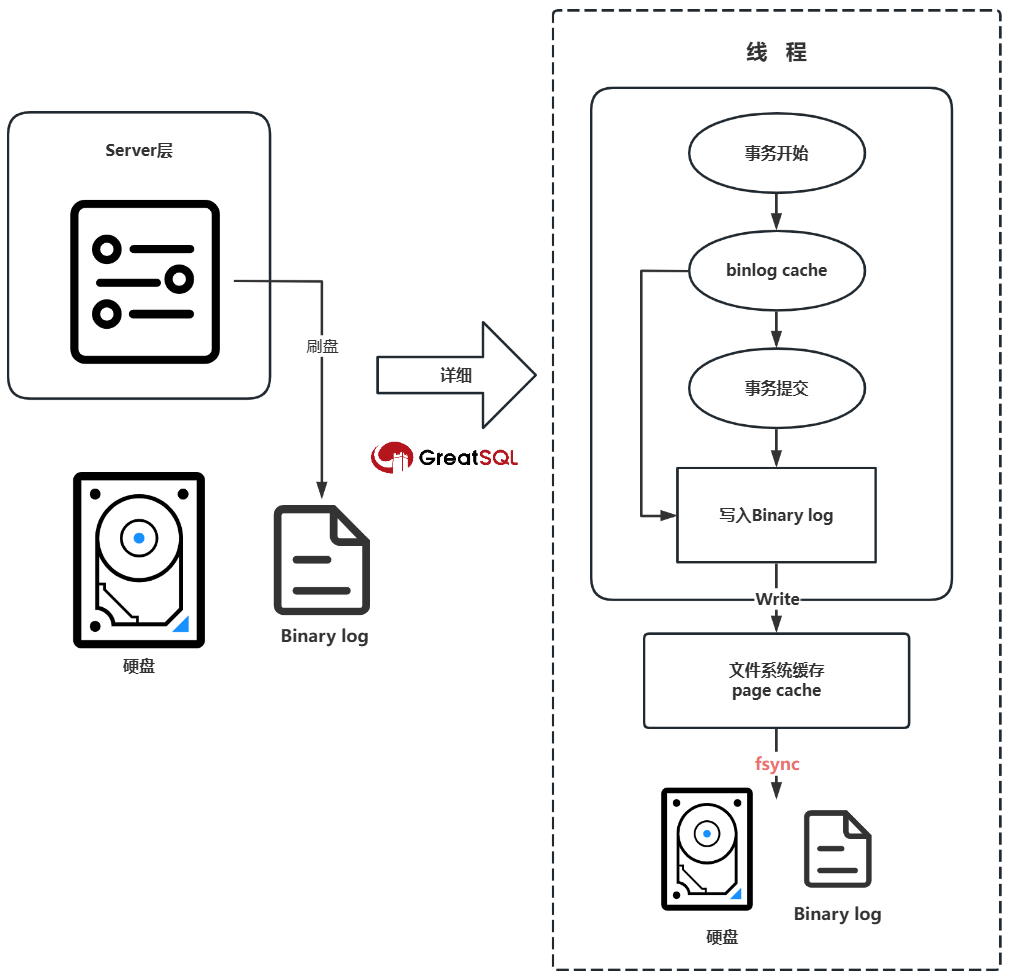
During transaction execution, corresponding Binlog Events are generated. These Events first need to be written to the Binlog cache. When the transaction commits, the Binlog cache is flushed and synchronized to the Binlog file. The events generated in the same transaction cannot be split; no matter how large the transaction is, it must be ensured that all of them are written. To improve write efficiency, GreatSQL allocates a Binlog cache for each thread.
The parameter binlog_cache_size is used to set the binlog cache size of each thread. When the amount of data buffered in the Binlog cache exceeds the threshold, the data needs to be temporarily stored on disk.
The Binlog flush process is as follows:
Tip
The Write action in the above figure refers to writing Binlog Events to the Page cache of the file system, without immediately synchronously flushing the data to disk, so it is relatively fast.
The fsync action is the operation that truly persists and flushes data to disk.
The parameter sync_binlog is used to set the timing of Write and fsync, with a default value of 1.
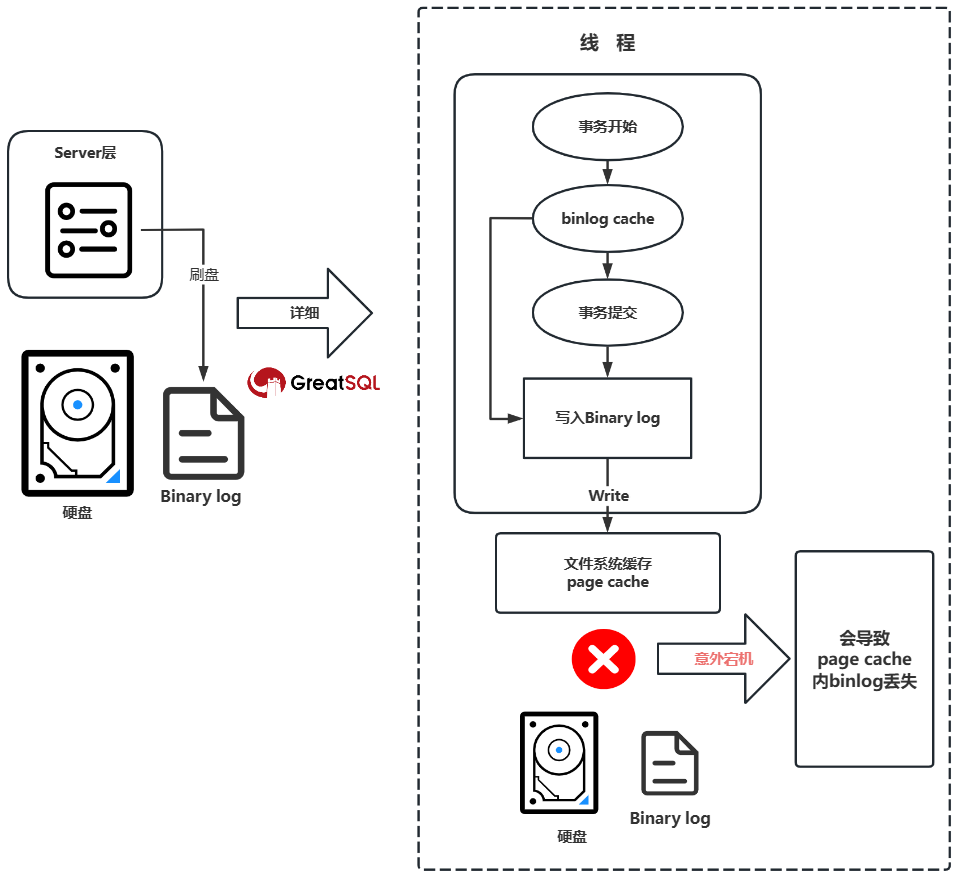
The differences between different settings of sync_binlog have been explained above. When set to 0, it means that each transaction commit only does Write to the Page cache of the operating system, and the operating system itself determines when to perform fsync. At this time, performance is the best, but it is also the most dangerous, because when the system fails and restarts, the Binlog Events temporarily stored in the Page cache are lost. As shown in the figure below:
In business scenarios requiring high data consistency, be sure to set it to 1, meaning that each transaction commit performs fsync to synchronously flush to disk immediately.
It can also be set to sync_binlog=N (N > 1), meaning that each transaction commit does Write to the Page cache of the operating system, and batch fsync is performed only after N commits accumulate. This is a compromise between performance and data reliability.
§ Differences and Similarities Between Binlog and Redo Log
- Redo Log is a physical logical log. Its content records what modifications were made on a certain data page. It only works at the InnoDB engine layer.
- Binlog is a purely logical log. Its content records events of database changes (usually understood as SQL statements that modify the database). It works at the Server layer, and all engines are involved.
- Both provide guarantees for the durability of transaction data, but the emphasis is slightly different:
- Redo Log provides transaction consistency guarantees and crash recovery support for the InnoDB engine.
- Binlog is mainly used for source-replica replication, MGR group replication, incremental backup (later used to recover to a specified point in time), and other purposes.
Scan the QR code to follow our WeChat Official Account
